
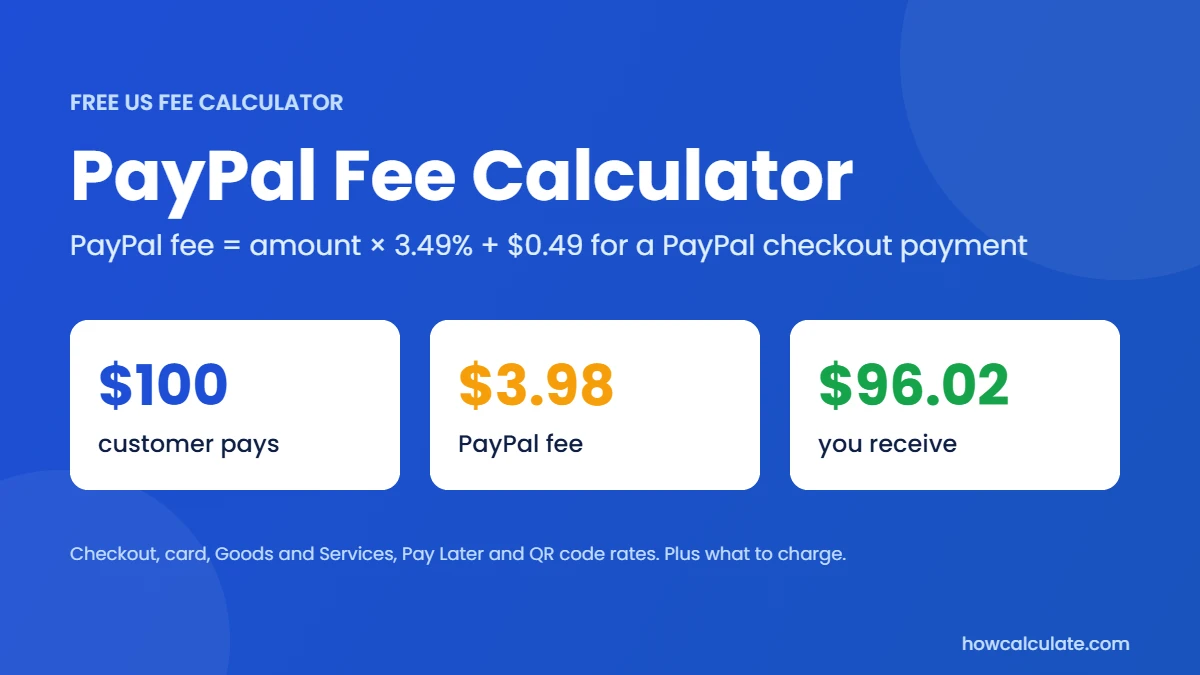
PayPal fee = payment amount × 3.49% + $0.49. That’s PayPal’s US rate when a customer pays through PayPal Checkout, Venmo or Guest Checkout. On a $100 sale, PayPal keeps $3.98 and you receive $96.02.
Rates checked 19 November 2026 against PayPal’s US business fees page. Checked by Ajay Kumar.
Based on PayPal’s US merchant fees for selling goods and services, last updated by PayPal on October 1, 2026 and checked November 19, 2026. Currency conversion, disputes and other fees are not included. Always confirm on PayPal’s fees page.
Enter an amount in this PayPal fee calculator, choose how the customer is paying, and it shows PayPal’s fee, what you actually receive and your effective rate. It also works as a reverse PayPal fee calculator, telling you what to charge if you need a set amount after fees. It covers PayPal Checkout and Venmo, standard card payments, Goods and Services payments, Pay Later and QR codes, with a tick box for customers outside the US.
If a buyer pays you directly on Venmo instead, the fee depends on whether they mark the payment as Goods and Services or Friends and Family. Our Venmo fee calculator covers those rates.
In short
- PayPal’s US rate for PayPal, Venmo, and Guest Checkout payments is 3.49% + $0.49.
- Standard credit and debit card payments cost less, at 2.99% + $0.49, and QR code payments are 2.29% + $0.09.
- When someone pays you with PayPal’s Goods and Services option, the fee is 2.99%, with no fixed fee.
- International payments add 1.5%. Currency conversion has its own spread on top.
- The fixed fee makes small sales costly: a $10 sale has an effective rate of 8.4%.
- To receive $100 after fees at the checkout rate, charge $104.12, not $103.98.
- PayPal doesn’t return its fees when you refund a payment.
How to use this PayPal fee calculator
- Enter the amount the customer pays.
- Choose the payment type. Pick checkout if they pay with the PayPal or Venmo button, card if they type in a card, or Goods and Services if they send money to your PayPal and mark it as a purchase.
- Tick the box if the customer is outside the US.
- Press Calculate to see the fee, what you receive, and what to charge to receive the full amount.
How much does PayPal take per transaction?
PayPal’s merchant fee has two parts: a percentage of the sale and a fixed fee. For a US business selling goods or services, the percentage depends on how the customer pays. The fixed fee depends on the currency you receive. In US dollars, it’s 49 cents for most payment types.
So there isn’t one PayPal fee. A customer who pays with their PayPal balance costs you more than one who pays with a card through your checkout, even though the money arrives the same way.
PayPal’s fees at a glance
These are PayPal’s US merchant rates for selling goods and services, from PayPal’s fees page, which showed a last-updated date of 19 November 2026. Last verified: 19 November 2026
| What | Fee |
|---|---|
| PayPal Checkout, Guest Checkout, Pay with Venmo | 3.49% + $0.49 |
| Standard credit and debit card payments | 2.99% + $0.49 |
| QR code payments | 2.29% + $0.09 |
| PayPal Pay Later options | 4.99% + $0.49 |
| International payments | add 1.50% |
| Currency conversion | a spread of 3% or 4% on the exchange rate |
| Dispute | $15.00 |
| Instant transfer to your bank or card | 1.5%, minimum $0.50 |
The calculator covers checkout, card, Goods and Services, Pay Later, and QR code payments, plus the international fee. It doesn’t include the card-fields option (Advanced Credit and Debit Card Payments, 2.89% + $0.29), which needs more setup. Invoicing uses the same rates as checkout, and PayPal lists “Pay by Bank (ACH)” on invoices at 1% capped at $10. Other products, such as Payouts and Point of Sale, have their own prices.
The fixed fee changes with the currency you receive, for example, 39 cents in euros or British pounds and 59 cents in Canadian or Australian dollars. This calculator uses US dollar fees.
How to calculate PayPal fees?
Multiply the payment amount by the percentage, then add the fixed fee.
- PayPal fee = amount × percentage + fixed fee
- Net payout = amount − fee
- Effective rate = fee ÷ amount × 100
- Price to charge to receive a set amount = (amount you want + fixed fee) ÷ (1 − percentage as a decimal)
For the checkout rate, the percentage is 0.0349 and the fixed fee is $0.49. For an international payment, add 0.015 to the percentage.
Here are the steps:
- Enter the payment amount.
- Multiply it by 0.0349 for PayPal, Venmo or Guest Checkout, or by 0.0299 for card payments.
- Add the fixed fee, $0.49.
- Subtract the result from the amount to get your net payout.
In a spreadsheet, put the amount in A2 and type =A2*0.0349+0.49 for the fee, then =A2-B2 for what you receive.
PayPal fee examples
These use the checkout rate of 3.49% + $0.49.
| Payment | Fee | You receive | Effective rate |
|---|---|---|---|
| $10 | $0.84 | $9.16 | 8.4% |
| $50 | $2.24 | $47.76 | 4.48% |
| $100 | $3.98 | $96.02 | 3.98% |
| $500 | $17.94 | $482.06 | 3.59% |
| $1,000 | $35.39 | $964.61 | 3.54% |
PayPal fees on bigger amounts
People often ask what PayPal takes on a specific amount. Here are the most common ones, for a checkout payment and a standard card payment.
| Payment | Checkout fee (3.49% + $0.49) | Card fee (2.99% + $0.49) |
|---|---|---|
| $250 | $9.22 | $7.97 |
| $750 | $26.67 | $22.92 |
| $2,500 | $87.74 | $75.24 |
| $5,000 | $174.99 | $149.99 |
Example 1: a $100 sale
Fee = 100 × 0.0349 + 0.49 = $3.98. You receive $96.02.
Example 2: the same sale paid by card
If the customer pays with a standard debit or credit card, the rate is 2.99% + $0.49. The fee is 100 × 0.0299 + 0.49 = $3.48, and you receive $96.52. That’s 50 cents more in your pocket than the checkout rate.
Example 3: an international customer
A customer outside the US pays $100 through PayPal Checkout. The rate is 3.49% + 1.5% = 4.99%, so the fee is 100 × 0.0499 + 0.49 = $5.48, and you receive $94.52.
Example 4: a month of orders
You take 200 orders of $40 through checkout. The fee on each is 40 × 0.0349 + 0.49 = $1.89 (rounded), so the month costs $378 in fees on $8,000 of sales, an effective rate of about 4.7%, and you keep $7,622.
Example 5: a QR code payment
A $100 payment through a QR code costs 100 × 0.0229 + 0.09 = $2.38. That’s well below the checkout rate, because both the percentage and the fixed fee are lower.
Reverse PayPal fee calculator: How much should I charge to receive a set amount?
If you want to receive exactly $100, you can’t add the fee to the price and stop there. PayPal takes its percentage from the higher amount too.
The formula is price = (amount you want + $0.49) ÷ (1 − 0.0349). For $100, that’s 100.49 ÷ 0.9651, which rounds to $104.12. At that price, PayPal’s fee is $4.12, and you receive exactly $100.00.
| You want to receive | PayPal, Venmo or Guest Checkout | Same, international | Card payment | Card payment, international |
|---|---|---|---|---|
| $50 | $52.32 | $53.14 | $52.05 | $52.86 |
| $100 | $104.12 | $105.77 | $103.59 | $105.21 |
| $250 | $259.55 | $263.65 | $258.21 | $262.27 |
| $500 | $518.59 | $526.78 | $515.92 | $524.02 |
| $1,000 | $1,036.67 | $1,053.04 | $1,031.33 | $1,047.52 |
Why adding the fee isn’t enough?
Say you add the $3.98 fee to $100 and charge $103.98. PayPal’s fee on $103.98 is $4.12, so you receive $99.86, which is 14 cents short. The gross-up formula fixes that.
Does PayPal charge a fee when someone sends you money?
It depends on how they send it. If a friend or family member sends you money as a personal payment in the US, you don’t pay anything to receive it. They don’t pay either if they use their PayPal balance or bank account. If they pay with a card, they pay 2.90% + $0.30 (PayPal’s consumer fees). If the money is for something you sold, it should be sent as Goods and Services. Then you, the seller, pay 2.99% of the amount. That fee is what buys the buyer PayPal’s purchase protection, so don’t ask customers to send business payments as Friends and Family. To see the Goods and Services fee on your own amount, choose that option in the calculator above.
International payments and currency conversion
Two charges can apply when you sell across borders, and they work differently:
- The international fee is 1.5% added to the normal percentage. The calculator includes it when you tick the box.
- Currency conversion applies when PayPal converts money from one currency to another. PayPal doesn’t charge it as a separate line. Instead, it builds a spread into the exchange rate, listed at 3% for most transactions and 4% in some cases, such as paying in a currency other than the one an item is listed in.
Because the spread is hidden in the rate, it’s hard to see. If the base exchange rate would turn a payment into $100, a 3% spread means you get about $97. The calculator doesn’t add this, since the exact spread depends on the transaction. Check the rate PayPal shows before you accept a converted payment.
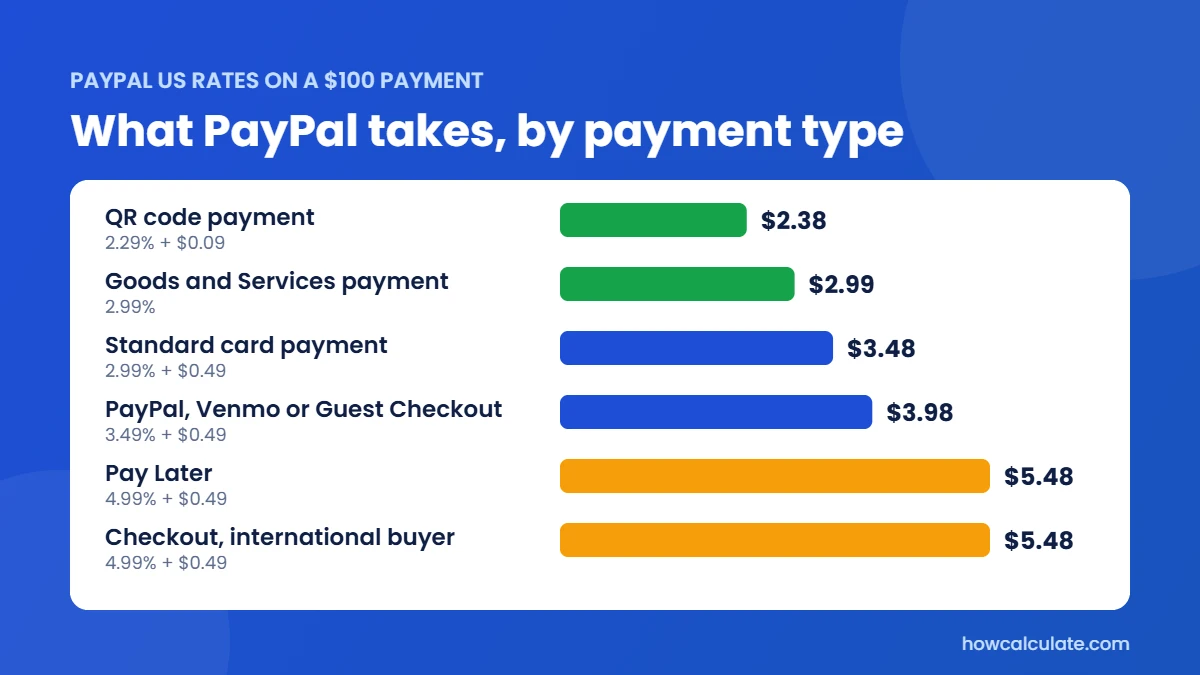
What PayPal takes on $100, by payment type
The way your customer pays makes a real difference. On the same $100, a QR code payment costs $2.38, while Pay Later or an international checkout costs $5.48.
PayPal fees you might not expect
- Refunds don’t return the fee. PayPal says there’s no fee to refund a payment, but the fees you originally paid to receive it aren’t returned.
- Disputes cost $15. PayPal lists a standard dispute fee of $15 in US dollars. It also lists a $20 chargeback fee for card payments that don’t go through a buyer’s PayPal account or Guest Checkout.
- Pay Later costs more. PayPal’s Pay Later options are 4.99% + $0.49.
- Instant transfers have a fee. Moving money to your bank or card instantly costs 1.5% with a 50-cent minimum, while standard transfers to a linked bank account are free when no currency conversion is involved.
- Optional services have their own prices. For example, PayPal lists a monthly fee for its invoice subscription service.
PayPal vs Stripe: which is cheaper?
At standard US rates, Stripe’s online card fee is 2.9% + $0.30, so it comes out cheaper than PayPal’s checkout rate and its standard card rate, mainly because of its lower fixed fee. The exception is PayPal’s card-fields option (Advanced Credit and Debit Card Payments), which costs 2.89% + $0.29 and comes out a few cents cheaper than Stripe. It takes more setup, so most small sellers use the standard buttons.
Here’s the fee on the same sale:
| Sale | Stripe (2.9% + $0.30) | PayPal checkout (3.49% + $0.49) | PayPal card payment (2.99% + $0.49) |
|---|---|---|---|
| $10 | $0.59 | $0.84 | $0.79 |
| $50 | $1.75 | $2.24 | $1.99 |
| $100 | $3.20 | $3.98 | $3.48 |
| $500 | $14.80 | $17.94 | $15.44 |
Cost isn’t the only factor. Many customers prefer to pay with PayPal, and offering it can raise sales. You can check the Stripe side with the Stripe fee calculator.
How to lower your PayPal fees?
- Steer customers to card payments or QR codes where you can. Card payments are 2.99% + $0.49, and QR code payments are 2.29% + $0.09, against 3.49% + $0.49 for checkout.
- Use bank payments for large invoices. On a $2,000 invoice, Pay by Bank (ACH) costs $10 at most, while a checkout payment costs $70.29 and a card payment costs $60.29.
- Avoid unnecessary refunds and disputes, since the original fee isn’t returned and disputes cost $15.
- Check your currency settings so you aren’t paying a conversion spread you could avoid.
- Use standard transfers to cash out. Moving money to a linked bank account the standard way is free, while instant transfers cost 1.5%.
- Ask about special rates. PayPal lists lower charity rates for approved nonprofits, and it may offer other pricing for high volumes. Check your account or ask PayPal.
Should you pass PayPal fees to your customers?
You have a few options:
- Absorb the fee and treat it as a cost of doing business.
- Build the fee into your prices, using the table above.
- Add a surcharge. Rules on this vary by country, state and by PayPal’s own terms, so check them before you add one.
- Offer a cheaper payment method for large amounts.
If you also sell on a marketplace, remember its own fees come on top of PayPal’s. See our Shopify fee calculator and Etsy fee calculator.
PayPal fees in other countries
This calculator uses US pricing for US accounts. PayPal publishes separate fee pages for each country, and the percentages, fixed fees and international rules differ. If your account is based outside the US, use the fees page for your country on PayPal’s site.
Common PayPal fee mistakes
- Forgetting the fixed fee, which matters most on small sales.
- Assuming every PayPal payment costs the same, when the rate depends on how the customer pays.
- Adding the fee to the price instead of using a gross-up.
- Leaving out the 1.5% international fee.
- Ignoring the currency conversion spread.
- Expecting a refund to return the fee.
- Using last year’s rates.
PayPal fee calculator FAQ
How much does PayPal take per transaction?
For a standard US PayPal, Venmo or Guest Checkout payment, PayPal takes 3.49% plus $0.49. On a $100 sale, that’s $3.98, and you receive $96.02.
What is PayPal’s percentage fee?
It depends on how the customer pays: 3.49% for PayPal, Venmo and Guest Checkout, 2.99% for standard card payments, and 2.29% for QR codes. Each also has a fixed fee, and international payments add 1.5%.
How do you calculate PayPal fees?
Multiply the payment by the percentage and add the fixed fee. For a $50 checkout payment, that’s 50 × 0.0349 + 0.49 = $2.24.
How much should I charge to receive $100 after PayPal fees?
At the checkout rate, charge $104.12. The formula is (100 + 0.49) ÷ (1 − 0.0349). For a card payment, it’s $103.59.
Does PayPal charge extra for international payments?
Yes. PayPal adds 1.5% to the normal percentage for international commercial transactions, and a currency conversion spread may apply if PayPal converts the money.
Does PayPal refund its fees when I refund a customer?
No. PayPal doesn’t charge a fee for making a refund, but the fees you paid to receive the original payment aren’t returned.
Is PayPal more expensive than Stripe?
At standard US rates, yes. On a $100 sale, the fee is $3.98 on PayPal’s checkout rate and $3.20 on Stripe’s online card rate. Stripe’s fixed fee is lower, which helps on small sales. PayPal’s card-fields option (2.89% + $0.29) is slightly cheaper than Stripe, but it needs more setup.
Is this PayPal calculator for the US only?
Yes. It uses PayPal’s US merchant rates, and fixed fees differ by currency. Check PayPal’s fees page for your country if your account is based elsewhere.
How accurate is this calculator?
It uses the rates on PayPal’s own fees page and rounds to the nearest cent, so a real payout can differ by a cent. Confirm important figures on PayPal’s website.
Is the PayPal fee 3%?
Not exactly. The most common US rate is 3.49% plus 49 cents, so on a $100 sale you pay $3.98, closer to 4%. Card payments are 2.99% + $0.49, and Goods and Services payments are 2.99% with no fixed fee.
Does PayPal take 25%?
No. For normal US sales, PayPal’s fee is between about 2.3% and 5% plus a small fixed fee. If you lost far more than that, check whether the payment involved currency conversion, a refund or a dispute.
Does PayPal charge a fee to cash out?
Not for a standard transfer to a linked US bank account. An instant transfer to your bank or card costs 1.5%, with a 50-cent minimum.
Why are PayPal fees so high?
PayPal charges more than some processors because its checkout comes with buyer and seller protection, and many shoppers trust the PayPal button. The fixed 49-cent fee also makes small sales expensive: on a $10 sale, the fee is 8.4%.
How this calculator works
The PayPal fee calculator runs entirely in your browser, so nothing you type is sent anywhere. It uses the US rates from PayPal’s official fees page, last verified on 19 November 2026. I test every result against hand-calculated examples, and I recheck the rates regularly. See How We Calculate for more.
HowCalculate isn’t affiliated with PayPal. Results are estimates, not financial advice. Looking for more tools? See all the Fee Calculators.
By Ajay Kumar, SEO strategist and content writer. Last updated:19 November 2026