PayPal vs Venmo for Business: Fees, Pros and Cons
If your customers already pay their friends with Venmo, asking them to pay you the same way feels natural. If they find you through a website, pay by card or live outside the US, PayPal is generally the more practical choice. That one question, how your customers like to pay, decides most of the PayPal vs Venmo for business choice. The fees decide the rest.
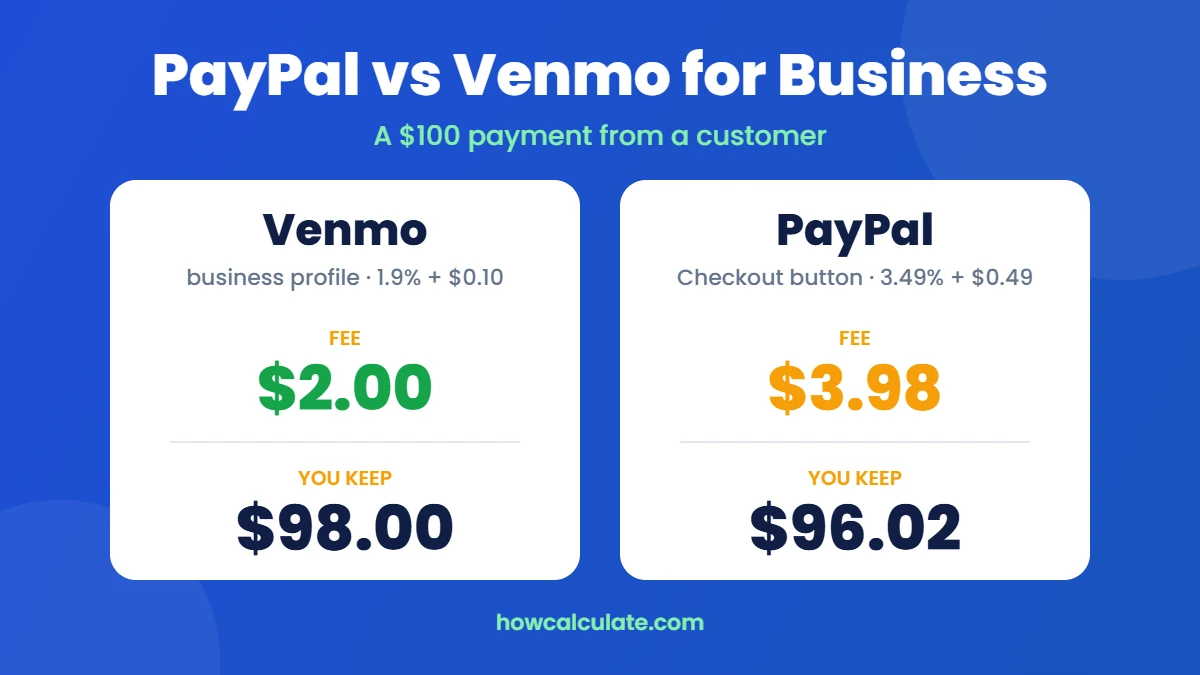
The short answer: a Venmo business profile charges 1.9% + $0.10 per payment and suits local, in-person and repeat customers in the US. PayPal charges 3.49% + $0.49 through its Checkout button, but it works on websites, takes cards online, sends invoices and reaches buyers in other countries. On a $100 payment you keep $98.00 with Venmo and $96.02 with PayPal Checkout.
PayPal vs Venmo at a glance
- Lowest fee for Venmo users: Venmo business profile, 1.9% + $0.10.
- In person: a tie on price. Venmo Tap to Pay and PayPal’s QR code both cost 2.29% + $0.09.
- Online and website payments: PayPal. Venmo on a website runs through PayPal Checkout or PayPal’s Braintree platform.
- Card payments online: PayPal, at 2.99% + $0.49.
- International customers: PayPal only. Venmo is US only.
- Invoices: PayPal.
- Best for: Venmo suits local service businesses and market sellers. PayPal suits online stores, freelancers with remote clients and anyone selling abroad.
By Ajay Kumar. I build the fee calculators on HowCalculate and check every fee against the provider’s own pages. Fees last verified November 3, 2026.
PayPal vs Venmo fees for business
Here are the PayPal business fees and Venmo business fees for US accounts, split by how the customer pays.
| How the customer pays | Venmo | PayPal |
|---|---|---|
| From the Venmo app, to your business profile | 1.9% + $0.10 | No equivalent. PayPal’s rate depends on the method in the rows below |
| In person | 2.29% + $0.09 (Tap to Pay) | 2.29% + $0.09 (QR code) |
| Online, on your website | Through PayPal Checkout: 3.49% + $0.49 | 3.49% + $0.49 (Checkout) |
| Online by card (you process it) | Not available | 2.99% + $0.49 |
| Goods and services on a personal account | 2.99% | 2.99% |
| Customer outside the US | Not available | +1.5%, plus currency conversion if it applies |
| Instant payout to your bank | 1.75% (min $0.25, max $25) | 1.5% (min $0.50) |
| Standard payout to your bank | Free | Free |
Sources: Venmo’s fee page, Venmo’s Tap to Pay FAQ and PayPal’s business fees page (updated October 1, 2026). PayPal may also add a currency conversion spread when it converts an international payment. The charge depends on the service and the transaction, so check PayPal’s current currency conversion terms before working out your final cost. Venmo’s own help pages don’t always show the same Tap to Pay rate, so we use its fee schedule and Tap to Pay FAQ, and you should confirm the rate in the app.
What a single $100 payment costs?
- Venmo business profile: 1.9% is $1.90, plus $0.10 fixed = $2.00 fee. You keep $98.00.
- Venmo Tap to Pay or PayPal QR code: 2.29% is $2.29, plus $0.09 = $2.38. You keep $97.62.
- PayPal card payment: 2.99% is $2.99, plus $0.49 = $3.48. You keep $96.52.
- PayPal Checkout: 3.49% is $3.49, plus $0.49 = $3.98. You keep $96.02.
How Venmo and PayPal work for a business?
Venmo personal account vs business profile. Your personal Venmo is for paying friends. To sell, you add a free business profile to the same login in the app. It gets its own name, profile and QR code, and you switch between the two with a tap. Venmo expects business payments to go to the business profile. If a customer pays your personal account and tags it as a purchase, you pay 2.99% instead.
PayPal Business account. You open a free PayPal Business account. From there you can add the Checkout button to your website, create a QR code, send invoices and take card payments. It takes a little longer to set up, but it does much more.
PayPal vs Venmo fees on 200 sales a month
Let’s look at an example month. Say you make 200 sales of $40 each, so $8,000 in sales.
- Venmo business profile: $0.76 + $0.10 = $0.86 a sale. Over 200 sales: $172.00.
- PayPal QR code (in person): $0.92 + $0.09 = $1.01 a sale (rounded). Over 200 sales: $201.20.
- PayPal Checkout (online): $1.40 + $0.49 = $1.89 a sale (rounded). Over 200 sales: $377.20.
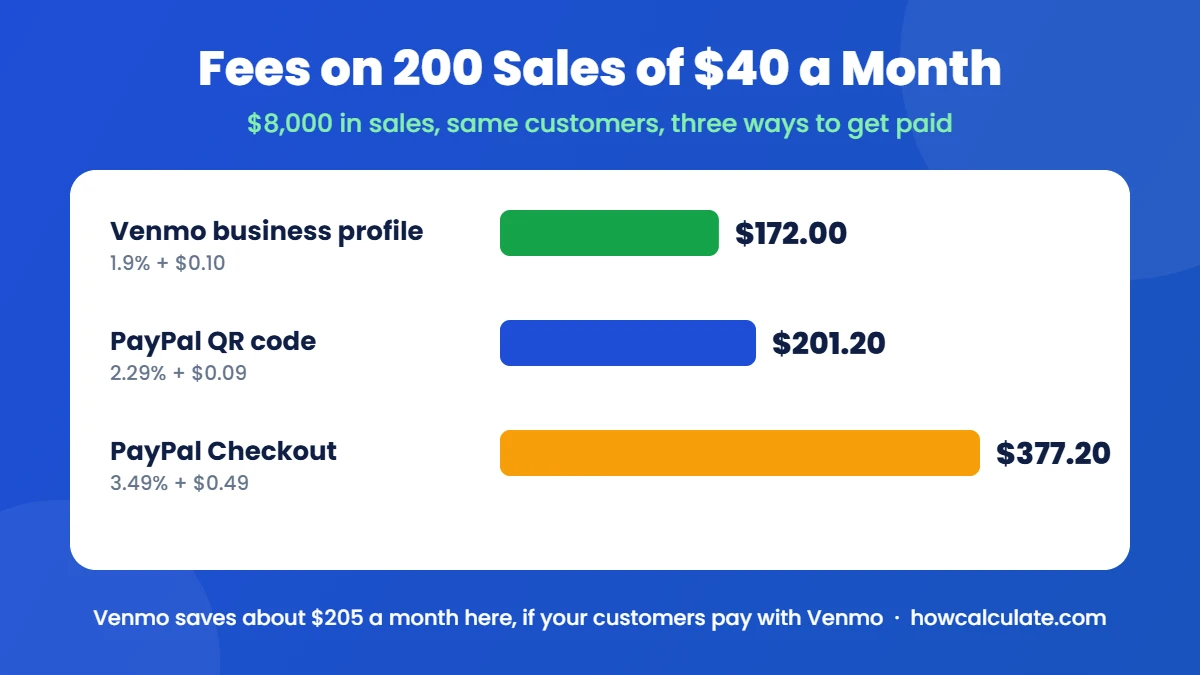
How we worked this out: each fee is the percentage times the sale, plus the fixed fee, times 200 sales. The totals leave out refunds, chargebacks, payout fees and currency conversion, since those depend on your business.
In this example Venmo saves about $205 a month over PayPal Checkout. But a cheaper fee only helps if customers actually pay. If a quarter of them walk away because they don’t use Venmo, you lose far more in sales than you save in fees. That’s why the way your customers like to pay matters more than the rate. Try your own numbers in our Venmo fee calculator and PayPal fee calculator.
When Venmo for business is the better choice?
- You sell in person or locally. Food trucks, markets, salons, tutors, cleaners and trainers. Customers scan your code or tap to pay.
- Your customers are in the US and already use Venmo. No new app and no account to create.
- You want low fees on everyday payments. 1.9% + $0.10 is one of the cheapest ways to take money from a customer’s phone.
- You want simple. The business profile sits next to your personal account, with no monthly fee.
The $9.17 rule for small payments
The 10-cent fixed fee changes things on tiny payments. On a $5 payment, the business profile costs $0.20 (1.9% is $0.095, plus $0.10), while a 2.99% goods and services payment costs $0.15. The two cost the same at about $9.17. Above that, the business profile wins and the gap grows: on $50 it’s $1.05 against $1.50. This isn’t a reason to take business payments on a personal account. Venmo expects sales to go through a business profile, and tagged personal payments still carry the 2.99% fee. It just shows why the business profile matters most once your sales are more than a few dollars.
When PayPal business is the better choice
- You sell online. PayPal’s Checkout button works on your website and on most store builders.
- Customers want to pay by card online. They can use a card without a PayPal account.
- You send invoices. If a client pays an invoice by bank transfer (ACH), the fee is 1%, capped at $10.
- You have buyers outside the US. Venmo can’t take their money at all.
- You make bigger sales. PayPal’s invoices, records and dispute tools are more useful as order sizes grow.
PayPal vs Venmo for small businesses: which fits yours?
- Freelancers: PayPal usually fits better, because of invoices and clients in other countries. If your clients are local and already use Venmo, a Venmo business profile is cheaper.
- Local and service businesses: Venmo is the cheaper everyday option. If you need a full till with stock, staff and reports, a point-of-sale system like Square does more, while Venmo is simpler with no hardware and no monthly fee.
- Online and ecommerce stores: PayPal, since Venmo on a website runs through PayPal Checkout anyway. Compare it with Stripe as well. Our Stripe fee calculator and guide to Stripe fees show what card payments cost there.
Can you use PayPal and Venmo for the same business?
Yes, and many small businesses do. A common setup is a Venmo QR code at the counter for local customers, and PayPal on the website and invoices for everyone else.
To take Venmo on a website, the usual route is PayPal Checkout, which can show a Venmo button to US shoppers. Developers can also add Venmo through PayPal’s Braintree platform. Either way, website payments are charged at the online rate, not Venmo’s 1.9% + $0.10 business profile rate.
Buyer and seller protection compared
- Buyers: both cover eligible purchases. On Venmo, payments tagged as a purchase are covered by Purchase Protection if an item doesn’t arrive or isn’t as described. PayPal has its own Purchase Protection for eligible goods.
- Sellers: Venmo says its Purchase Protection program can help sellers with unauthorized payments and claims that the buyer never got their order. PayPal offers Seller Protection for eligible transactions, mainly unauthorized payments and items not received on tracked, shipped orders.
- Disputes and chargebacks: these are two different charges on PayPal’s fee schedule. A dispute fee ($15 on standard rates) applies when a buyer opens a dispute through PayPal. A chargeback fee ($20) applies when the buyer goes to their card issuer instead. Budget for both if you sell online.
- Friends and family payments: no protection on either. Never ask customers to pay you as a personal payment to save the fee.
Which one protects you better depends on what you sell and how you deliver it, so read the current terms on each before you rely on them.
The downsides of Venmo for business
- US only. No international customers.
- Built around the Venmo app. It works best when your customers already have Venmo.
- Fewer business tools. Nothing like PayPal’s invoicing, and much simpler reports.
- Instant payouts cost a bit more. 1.75% against PayPal’s 1.5%, though Venmo caps it at $25 and standard payouts are free on both.
Frequently asked questions
How much does Venmo take from $100 for business?
$2.00 on a business profile (1.9% + $0.10), so you keep $98.00. On a personal account with the payment tagged as goods and services, it’s $2.99, and you keep $97.01.
How much does PayPal take from $100?
It depends on how you’re paid: $3.98 through PayPal Checkout (3.49% + $0.49), $3.48 for a standard card payment (2.99% + $0.49) and $2.38 for a QR code payment in person (2.29% + $0.09).
Is Venmo cheaper than PayPal for business?
For most payments from customers who use Venmo, yes. The business profile rate of 1.9% + $0.10 is lower than PayPal Checkout and PayPal card payments. In person, Venmo Tap to Pay and PayPal’s QR code cost the same, and on very small payments a 2.99% goods and services payment can cost less on either.
Is PayPal or Venmo better for freelancers?
PayPal, for most freelancers. It sends invoices, takes cards and works with clients in other countries. Venmo is cheaper only if your clients are in the US and happy to pay through Venmo.
Can customers pay with a credit card through Venmo Business?
In person, yes. Venmo’s Tap to Pay lets you accept contactless cards and digital wallets from people without Venmo, at 2.29% + $0.09, while you’re in the US. Online, card payments go through PayPal Checkout instead.
How do I avoid the 3% fee on Venmo?
Venmo generally charges 3% when someone sends a personal payment with a credit card. Customers paying an eligible business profile are exempt from this standard credit card sending fee, though your business still pays its normal seller fee. Paying from a Venmo balance, bank account or debit card is free.
Do I need a separate account for Venmo business?
No. A Venmo business profile is added to your personal Venmo login, and you switch between them in the app.
So, PayPal or Venmo for your business?
In the PayPal vs Venmo for business choice, a Venmo business profile is the cheaper option for US businesses that sell in person to customers who already use Venmo. If you sell online, send invoices or have buyers abroad, start with PayPal, and plenty of businesses run both. Check a typical sale in our Venmo fee calculator and PayPal fee calculator before you decide.
Fees can change, so check Venmo’s and PayPal’s fee pages before you set your prices.