How to Get More Viewers on TikTok LIVE: What Actually Works?
A TikTok LIVE with four viewers isn’t a failure. It’s TikTok telling you it doesn’t know who to show your stream to yet. Viewer counts on LIVE come from two places: people who already follow you and get a notification, and strangers TikTok pushes your stream to in the LIVE feed and For You feed. You grow by making both of those work harder.
The short answer: to get more viewers on TikTok LIVE, go live at the same time every week, announce it ahead with a LIVE Event and a teaser video, hook people in the first few seconds, keep them talking, go live with another creator, and stay on long enough for TikTok to keep sending people in. If you sell on TikTok Shop, give viewers a reason to stay that they can’t get anywhere else, like a LIVE-only price.
By Ajay Kumar, SEO strategist and content writer. Last updated: November 5, 2026
Why your TikTok LIVE gets no viewers?
Before you try new tricks, check for these. Most low-view LIVEs have at least one of them:
- Nobody knew you were going live. You started on a whim, so even your followers missed it.
- A different time every time. Your audience can’t build a habit around a stream that moves.
- A slow start. The first people who drop in see you fixing your phone or waiting in silence, and they swipe away.
- A vague title. “Come chat” gives nobody a reason to tap.
- Ending too soon. A 10-minute LIVE ends right when TikTok starts sending people in.
- Bad sound or a weak connection. People forgive average video. They leave fast when they can’t hear you.
- A rules problem. If your account has a guideline strike, your LIVE can be shown to fewer people or blocked. Check your account status in Settings.
Before you go live: set it up so people show up
Pick the best time to go live, and keep it
Choose one or two slots a week and stick with them for at least a month. People come back to things they can plan around. There’s no single best time for everyone. Open your TikTok analytics, look at the Followers tab, and see the hours your followers are most active. Start there, then compare your LIVE numbers after a few weeks.
Announce it with a LIVE Event
TikTok lets you schedule a LIVE Event ahead of time. It shows on your profile, and people can register and get a notification when you start. That turns a random stream into an appointment. Share the event in your videos and stories too, so it isn’t just sitting on your profile.
Post a teaser video an hour or two before
A short video that says exactly what will happen on the LIVE does two jobs. It reminds your followers, and it can reach new people on the For You feed. Use the 3-second rule here: the first three seconds of the teaser should say the payoff, like “Going live at 8 to test the cheapest viral blender, and I’m answering every question.”
Get the basics right
- Sound first. A cheap clip-on mic beats a great camera. Test it before you go live.
- Light on your face. Sit facing a window or a ring light, not with one behind you.
- A stable connection. Use Wi-Fi you trust and close other apps.
- A clear title. Say what people get: “Packing 50 orders live, ask me anything about selling on TikTok Shop.”
- A helper if you can. A moderator can answer comments and remove spam while you talk.
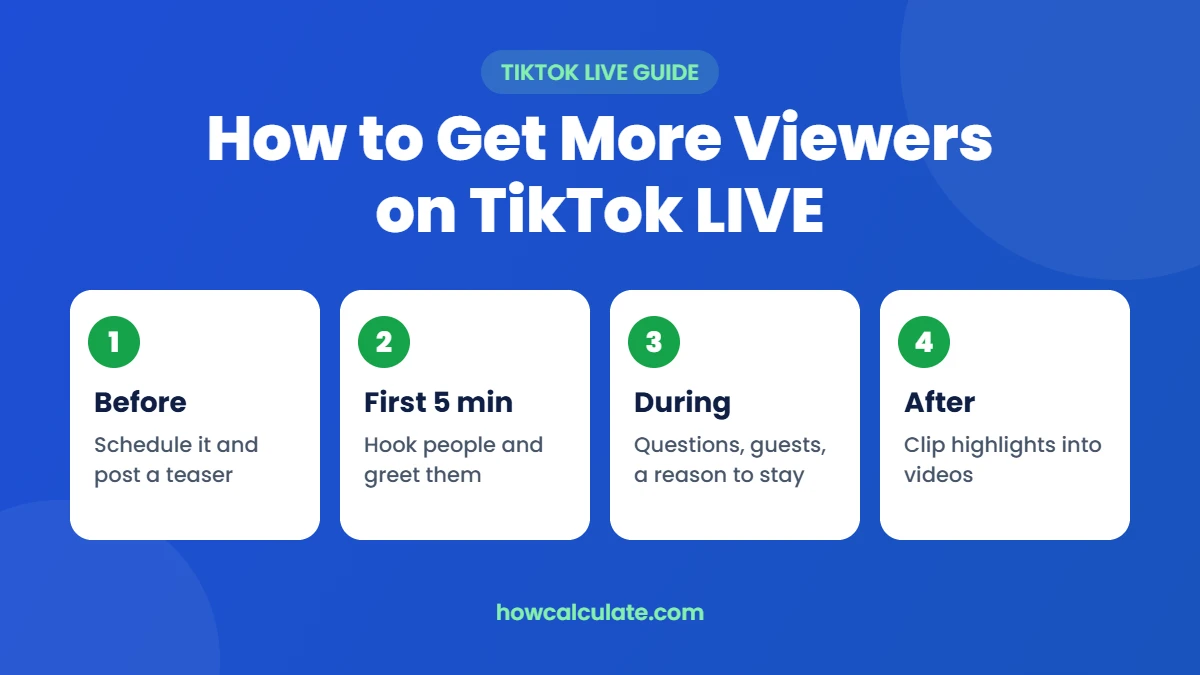
The first 5 minutes decide most of your LIVE
The people who arrive early are your best chance to get more people. When they stay, comment and send likes, TikTok has a reason to show the stream to more people. When they leave in seconds, it doesn’t.
- Start talking straight away. No “let’s wait for people to join.” Say what the LIVE is about in one sentence, then start.
- Greet people by name. “Hey Maria, you made it.” It sounds small, but it keeps people around.
- Ask an easy question early. “Where are you watching from?” gets the comments moving.
- Repeat the hook every few minutes. New people arrive all the time and missed your opening.
During the LIVE: give people a reason to stay
- Run it like a show, not a chat. Plan three or four segments, like a demo, a question round and a giveaway or deal at the end. Tell viewers what’s coming next.
- Use Q&A and pinned comments. Pin the main question or offer so new viewers understand the LIVE at a glance.
- Go live with another creator. A guest in your niche brings their viewers into your stream, and yours into theirs. Pick someone close to your size so it helps you both.
- Ask for the follow, once you’ve earned it. After a useful moment, ask people to follow so they get notified next time. That’s how your next LIVE starts with more viewers.
- Stay on long enough. A common rule of thumb is at least 30 minutes, and closer to an hour if you can, because new viewers keep drifting in the longer you’re live. If you can only do 15 minutes, do 15 minutes every week rather than one long stream a month.
After the LIVE: turn one stream into more viewers next time
- Clip the best moments. A good answer or a funny moment from your LIVE makes a strong short video, and it can bring new people to your next stream.
- Check your LIVE analytics. Look at how long people stayed and when they left. If everyone left at minute 4, your opening needs work.
- Thank people in a video. Mention a few commenters by name and say when you’re going live next.
Should you pay to promote your TikTok LIVE?
You can. TikTok’s Promote tool has a Boost LIVE goal that’s meant to get more LIVE views and LIVE followers. According to TikTok’s Promote help page, you have to be at least 18 to use Promote, and your account needs at least 1,000 followers to promote a LIVE.
Paying for viewers only makes sense if those viewers are worth something to you, like sales, real followers or gifts. Set a small budget, check what you got back, and only then spend more. Our guide to whether TikTok Promote is worth it shows how to work out if a boost pays for itself.
Selling on TikTok Shop? Get viewers who buy
For a seller, more viewers is only half the job. A LIVE with 300 viewers where nobody buys earns less than a LIVE with 80 viewers where five people do. These habits help a shopping LIVE:
- Pin the product you’re showing, so people can buy without leaving the stream.
- Show it working. Unbox it, use it, compare it with something cheaper. A demo answers questions a product page can’t.
- Give a LIVE-only reason to stay. A small discount or a bundle that only runs during the stream. Make sure your price can take it first.
- Say the price out loud, often. New viewers missed it the first time.
- Team up with creators. Affiliate creators can sell your product on their own LIVEs. You pay them a commission on each sale. See the average TikTok Shop affiliate commission before you set a rate.
How many LIVE viewers do you need to make it worth it?
Here’s a simple example, with no creator commission because it’s your own stream. You sell a $25 product that costs you $8, with $4 shipping and TikTok’s 6% referral fee ($1.50). That leaves you $11.50 profit on each order you sell on your own LIVE, before any ads, discounts or refunds.
- If 1% of 300 viewers buy, that’s 3 orders and $34.50 profit.
- If 2% buy, that’s 6 orders and $69.00.
- If 3% buy, that’s 9 orders and $103.50.
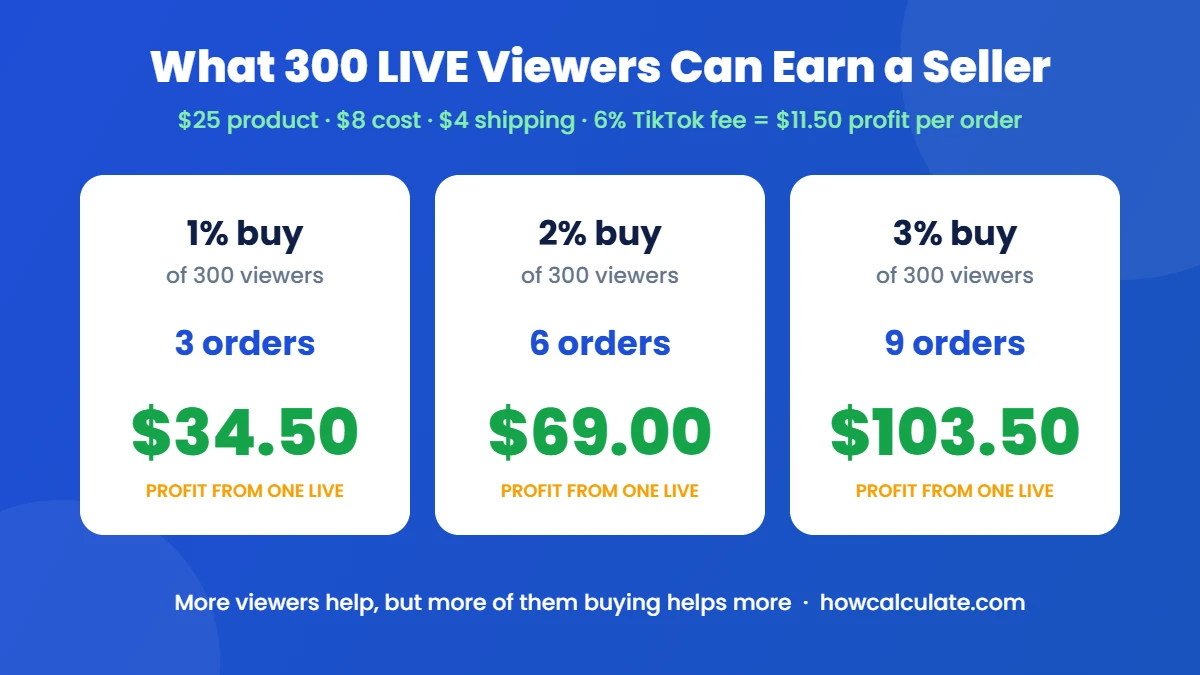
Getting 2% to buy instead of 1% doubles your money, just like doubling your viewers would, and it’s often easier. Put your own numbers into our TikTok Shop fee calculator to see your real profit per order, then decide how much a LIVE viewer is worth to you. If you add a LIVE-only discount or a paid boost, run those through the calculator too. For the bigger picture, our TikTok Shop strategy guide shows where LIVE fits in a plan that makes money.
Mistakes that keep your LIVE viewers low
- Buying viewers or followers. Fake engagement breaks TikTok’s Community Guidelines, and bots don’t buy, comment or come back.
- Going live only when you feel like it. No schedule means no habit.
- Talking to the camera like nobody’s there. Even with two viewers, talk to those two by name.
- Copying a big creator’s format. What works with 50,000 fans often feels empty with 50. Start small and personal.
- Giving up after a few streams. LIVE audiences grow slowly. Judge your progress over a month, not a night.
Frequently asked questions
Why am I getting no views on TikTok LIVE?
Usually because nobody knew you were going live, the stream started slowly, or it ended before TikTok had time to show it to more people. Schedule it with a LIVE Event, post a teaser, start with a clear hook and stay on for at least 30 minutes. If views suddenly dropped to almost nothing, check your account status for a guideline strike.
How many followers do you need to go LIVE on TikTok?
TikTok usually asks for 1,000 followers before you can go LIVE, and you need to be 18 or older. The rules can change and can differ by country, so check the LIVE option in your app.
How long should a TikTok LIVE be?
Aim for at least 30 minutes, and around an hour if you can. Short streams end before TikTok sends many new viewers. A short LIVE every week still beats a long one once a month.
Why can’t my viewers hear me on TikTok LIVE?
Check that the app has microphone permission, that you haven’t muted yourself, and that a Bluetooth headset isn’t taking over the audio. Test with a friend watching before an important stream.
What is the 3-second rule on TikTok?
It’s the idea that a video has about three seconds to grab attention before people swipe away. For LIVE, use it in your teaser video and in the first line you say when people drop in.
Does going LIVE help your TikTok grow?
It can. A LIVE gives followers a reason to come back and can bring in new people through the LIVE feed. The real growth usually comes from clipping your best LIVE moments into short videos afterwards.
Can you get more TikTok LIVE viewers for free?
Yes. A fixed schedule, LIVE Events, teaser videos, going live with other creators and posting clips afterwards all cost nothing. Paying to promote a LIVE is optional.
The bottom line
More viewers on TikTok LIVE come from the boring stuff done every week: the same time slot, a LIVE Event, a teaser video, a strong first minute and enough time on air. Add a guest now and then, and clip your best moments afterwards. If you sell, care just as much about how many viewers buy as how many show up, and check the math in the TikTok Shop fee calculator before you offer a LIVE-only deal.